
3 products
Gang Sheet Builder
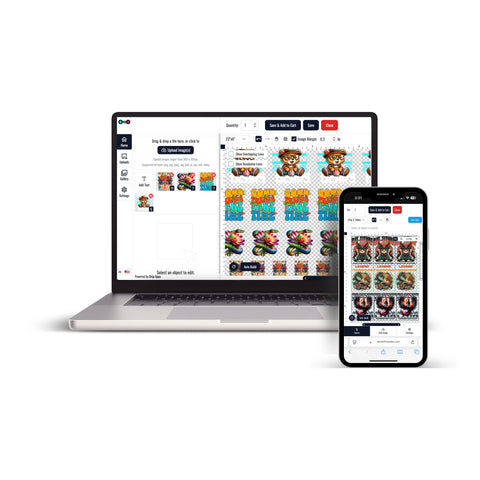
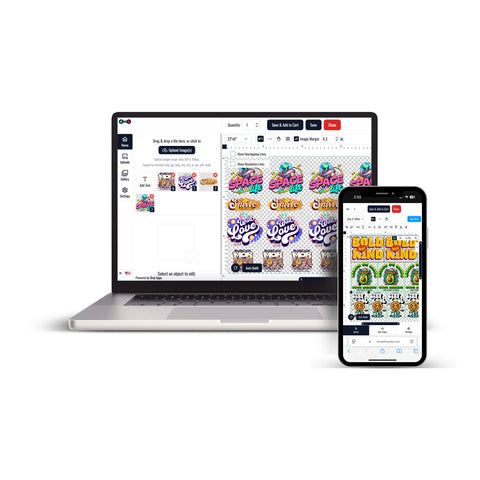

Gang Sheet Builder helps you organize multiple DTF designs into a single gang sheet before placing your order. Instead of preparing each graphic as a separate sheet, you can combine logos, artwork, text, and different design sizes into one layout.
This approach is useful for custom apparel projects that require several graphics, repeated designs, or different transfer sizes within the same order.
Build Your DTF Gang Sheet Online
With the Build Your DTF Gang Sheet option, you can upload your designs and organize them within the builder. The final gang sheet size is calculated according to the designs and quantities added to the layout.
Before adding artwork, prepare each design at its intended print size and review the file carefully. The product instructions recommend 300 DPI artwork at the correct dimensions with unwanted backgrounds removed.
What Can You Put on a Gang Sheet?
A gang sheet can contain multiple graphics within the same layout. Depending on your project, this may include:
- Repeated company or brand logos
- Different front and back graphics
- Small chest designs
- Names and numbers
- Artwork in several dimensions
- Multiple designs for an apparel order
Planning the dimensions and quantity of each graphic before building the sheet makes it easier to organize the available space.
Gang Sheet Builder or Print-Ready Gang Sheet?
The right ordering method depends on whether your gang sheet layout is already complete.
Use the builder when you have individual design files and want to arrange them into a gang sheet during the ordering process.
Upload a print-ready gang sheet when you have already created the complete layout yourself. The DTF Gang Sheets option allows you to select the appropriate sheet size and upload the completed gang sheet file.
Prepare Your Artwork Before Building
Check the artwork before placing designs into the layout. A simple preparation process can prevent sizing or file problems later in the order.
- Confirm the intended final dimensions of each design.
- Prepare artwork at the appropriate resolution.
- Remove unwanted backgrounds where necessary.
- Check the quantity required for each graphic.
- Keep designs separate when they require different final sizes.
- Review the completed layout before adding it to the order.
How to Use the Gang Sheet Builder
- Choose an approximate gang sheet size based on the designs you plan to upload.
- Upload your artwork and review it in the pre-check window.
- Make any necessary adjustments before adding the design to the builder.
- Add the required copies of each design and organize the layout.
- Review the completed gang sheet before continuing with the order.
Choose the Right Gang Sheet Workflow
A Gang Sheet Builder is most useful when your artwork exists as separate design files and still needs to be organized into one sheet. If your layout is already complete and print-ready, uploading the finished gang sheet provides a more direct ordering path.
Choose between these workflows based on the condition of your artwork, the number of graphics, their final dimensions, and how you want to prepare the sheet.
Let customers speak for us
Great interface and service!

I was very happy

Absolutely wonderful

GREAT START TO A WONDERFUL BUSINESS RELATIONSHIP

Awesome
Loved the friendly and professional customer service. Quick turnaround. I would definitely use this company again for my last minute printing needs.
Always amazing! That’s why I keep returning!
This place is awesome!!
Great service, great quality product, only DTF provider we will use for our business.
Always great quality!!!
Love it!
Always awesome!
I thought they were great. The prices are reasonable and the delivery was next day - can't beat that!!
Customer was happy with the product.
Amazing service!
