
3 products
Printer Bundles
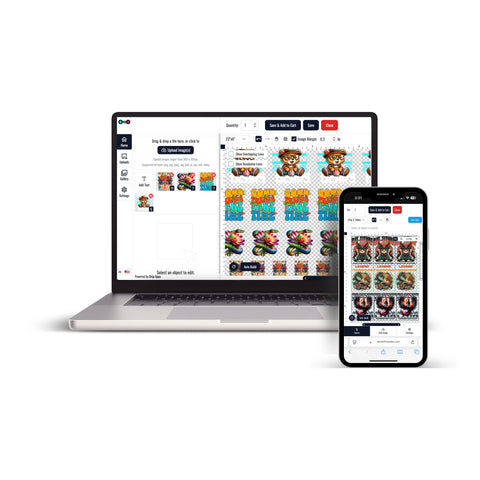


DTF Printer Bundle collection options provide different ways to prepare and order custom DTF transfers for compatible apparel projects.
The current collection includes individual DTF transfers, gang sheets, and an online gang sheet builder. Choose the format based on how your artwork is prepared, the number of designs required, and the final dimensions needed for the project.
Choose the Right DTF Transfer Format
Start by reviewing the artwork required for your order.
- Choose individual transfers when each design has a defined final size.
- Choose a gang sheet when several graphics are already arranged together.
- Use the gang sheet builder when multiple designs need to be organized into a sheet before ordering.
Build Your DTF Gang Sheet
If you have several graphics but have not prepared a completed gang sheet layout, Build Your DTF Gang Sheet allows designs to be uploaded and organized within the builder.
The current builder workflow allows you to select an approximate sheet size, upload designs, review them, and arrange the artwork before completing the order. The page currently recommends artwork prepared at the correct dimensions and 300 DPI with unwanted backgrounds removed. :contentReference[oaicite:1]{index=1}
Order a Prepared DTF Gang Sheet
If your artwork is already arranged as a completed multi-design layout, DTF Gang Sheets provide an ordering option for prepared gang sheet artwork.
This format can fit projects that include:
- Repeated logos
- Multiple artwork sizes
- Names and numbers
- Several graphics within one apparel project
Confirm the sheet dimensions and review the completed artwork before uploading the final layout.
Order Individual DTF Transfers by Size
If each design already has a defined width and height and does not need to be combined into a gang sheet, DTF Transfers By Size provide a direct ordering option for individual graphics.
This format can be useful for:
- Small chest logos
- Front graphics
- Back designs
- Sleeve artwork
- Names and numbers
- Separate graphics requiring different dimensions
Prepare Artwork Before Ordering
Before choosing a product format, review:
- The final dimensions of each design
- The intended garment placement
- The number of copies required
- Artwork resolution and image quality
- Background and transparency requirements
- Whether multiple graphics should be grouped together
How to Order from the DTF Printer Bundle Collection
- List the graphics required for the project.
- Determine the final dimensions and quantity of each design.
- Choose DTF Transfers By Size for individual graphics.
- Choose DTF Gang Sheets for a completed multi-design layout.
- Choose Build Your DTF Gang Sheet when designs still need to be organized into a sheet.
- Upload the artwork and review the layout, dimensions, and quantities.
- Complete the order after confirming the project details.
This ordering flow helps match the transfer format to the artwork and project requirements without adding unnecessary equipment or production steps.
Let customers speak for us
My transfer have always come out beautifully and the customer service is top tier.

Great product. Easy to pick up at business after business hours.
I was able to press on without any problems and it looks great.

Always absolutely amazing prints and speedy delivery time
As always, friendly, supportive and professional

The shipping and quality of the products ordered are always great!
Me encanta lo rápido que son para realizar las órdenes gracias
Love how quickly these are printed as well as the easy of ordering and quality.
So far I am loving the work
The quality of these prints was great, especially for the price! I loved being able to grab them 24/7 too, made it a lot easier for me

The transfers were great!
Had ready in a few hours and pickup after hours is great!
Quick and customer service was out of this world. They will always have me as a customer.
Great quality and service. Will be sure to use again.
thank you everything always !
DTF Transfer Ohio has been very patient with me and my senior friends.
It’s so convenient I can pick up the order the same day. They’re 15 minutes away.
